How to add example questions
This guide shows you how to surface predefined prompts next to the chat input as a popup menu.
The example_questions argument on Chat takes a list of strings. Each one becomes a clickable item in a menu next to the input field. Clicking an item fills the textarea.
Configure example questions
Chat with example questions
import vizro.models as vm
from vizro import Vizro
from vizro_experimental.chat import Chat, ChatAction, Message


class EchoAction(ChatAction):
    def generate_response(self, messages: list[Message]) -> str:
        return f"You said: {messages[-1]['content']}"


page = vm.Page(
    title="Chat with examples",
    components=[
        Chat(
            actions=EchoAction(),
            placeholder="Ask me anything or pick an example…",
            example_questions=[
                "What is the capital of France?",
                "Explain quantum computing in simple terms.",
                "Write a haiku about programming.",
                "What are the benefits of TypeScript over JavaScript?",
            ],
        )
    ],
)

Vizro().build(vm.Dashboard(pages=[page])).run()
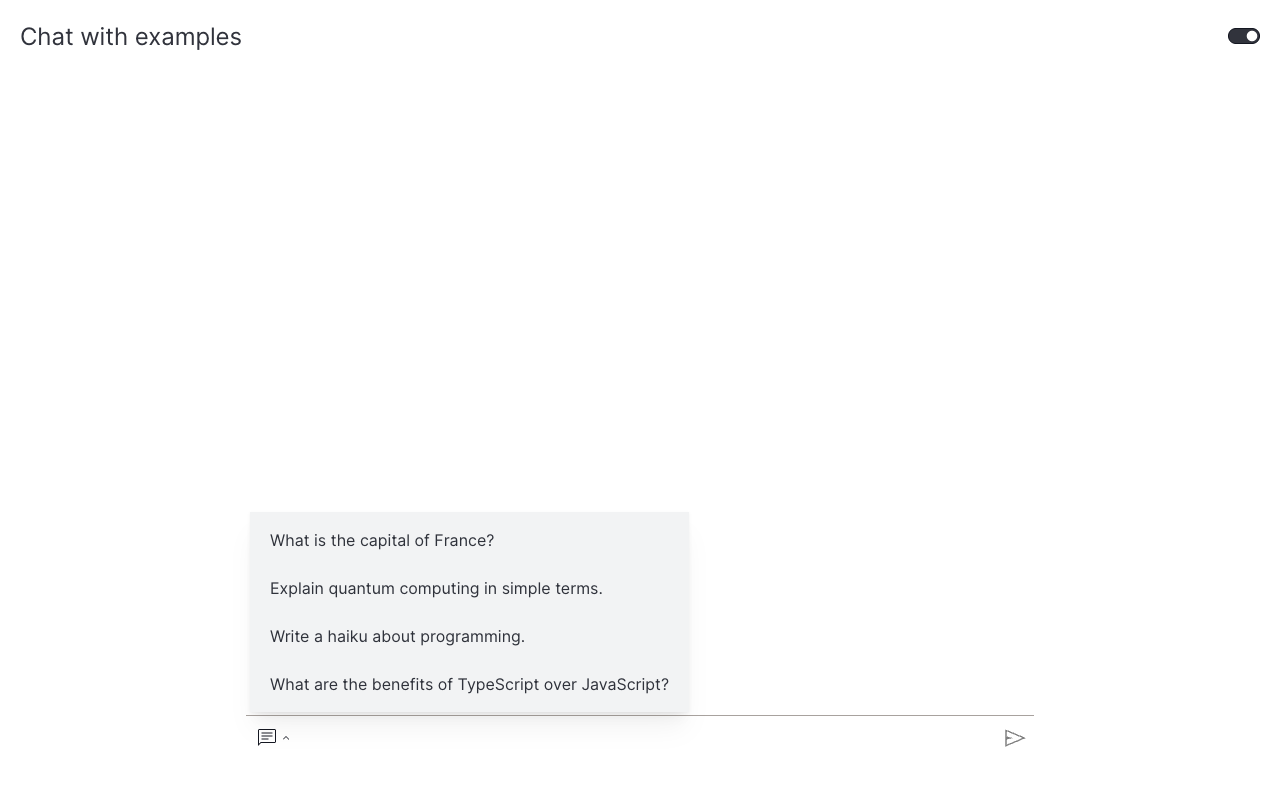
The chat icon next to the textarea opens a dropdown listing the four prompts above. Combining example questions with a real LLM action (see Use a real LLM or Stream text responses) gives users a guided entry point without locking them out of free-form questions.
What's next
- Add file upload: let users attach files for the action to process.
- Combine features: pair example questions with file upload and a generative backend.