How to render Dash components in responses
This guide shows you how to return rich content (Markdown, alerts, tables, accordions, charts, code blocks, images) from a chat action instead of plain text.
A ChatAction's generate_response can return any Dash component (or any object Plotly's JSON encoder can serialize). The component is rendered directly inside the assistant bubble. The example below combines several Dash and Mantine components in a single reply to showcase what's possible.
Component showcase
import dash_mantine_components as dmc
import plotly.express as px
from dash import dcc, html

import vizro.models as vm
from vizro import Vizro
from vizro_experimental.chat import Chat, ChatAction, Message


class mixed_content(ChatAction):
    """Example showing different content types: text, chart, and image."""

    def generate_response(self, messages: list[Message]) -> html.Div:
        prompt = messages[-1]["content"] if messages else ""

        # Sample data for table
        table_data = [
            {"feature": "Streaming", "status": "Supported", "description": "Real-time text generation"},
            {"feature": "File Upload", "status": "Supported", "description": "Images, CSV, Excel files"},
            {"feature": "Code Highlight", "status": "Supported", "description": "Syntax highlighting"},
        ]

        # Create a scatter plot
        fig = px.scatter(
            px.data.iris(),
            x="sepal_width",
            y="sepal_length",
            color="species",
            title="Interactive Plotly Chart",
        )

        # Sample code for CodeHighlight
        sample_code = '''def generate_response(self, messages):
    """Your custom chat logic here."""
    return "Hello, World!"'''

        return html.Div(
            [
                dcc.Markdown(f'**You said:** "{prompt}"'),
                dmc.Alert(
                    "This demo showcases various Dash components that can be rendered in chat responses!",
                    title="Component Showcase",
                    color="blue",
                    style={"marginTop": "15px", "marginBottom": "15px"},
                ),
                dmc.Table(
                    striped=True,
                    highlightOnHover=True,
                    withTableBorder=True,
                    withColumnBorders=True,
                    data={
                        "head": ["Feature", "Status", "Description"],
                        "body": [[row["feature"], row["status"], row["description"]] for row in table_data],
                    },
                    style={"marginBottom": "15px"},
                ),
                dmc.Accordion(
                    children=[
                        dmc.AccordionItem(
                            value="chart",
                            children=[
                                dmc.AccordionControl("Interactive Chart"),
                                dmc.AccordionPanel(
                                    dcc.Graph(figure=fig, style={"height": "400px", "width": "600px"})
                                ),
                            ],
                        ),
                        dmc.AccordionItem(
                            value="code",
                            children=[
                                dmc.AccordionControl("Code Example"),
                                dmc.AccordionPanel(
                                    dmc.CodeHighlight(code=sample_code, language="python", withCopyButton=True)
                                ),
                            ],
                        ),
                        dmc.AccordionItem(
                            value="image",
                            children=[
                                dmc.AccordionControl("Image"),
                                dmc.AccordionPanel(
                                    dmc.Image(
                                        radius="md",
                                        h=200,
                                        w="auto",
                                        fit="contain",
                                        src="https://raw.githubusercontent.com/mantinedev/mantine/master/.demo/images/bg-9.png",
                                    )
                                ),
                            ],
                        ),
                    ],
                    style={"marginBottom": "15px"},
                ),
                dmc.Blockquote(
                    "Any Dash component can be rendered in chat responses!",
                    cite="- Vizro Chat Component",
                    color="blue",
                    style={"marginBottom": "15px"},
                ),
            ]
        )


page = vm.Page(
    title="Mixed content chat",
    components=[Chat(actions=mixed_content())],
)

Vizro().build(vm.Dashboard(pages=[page])).run()
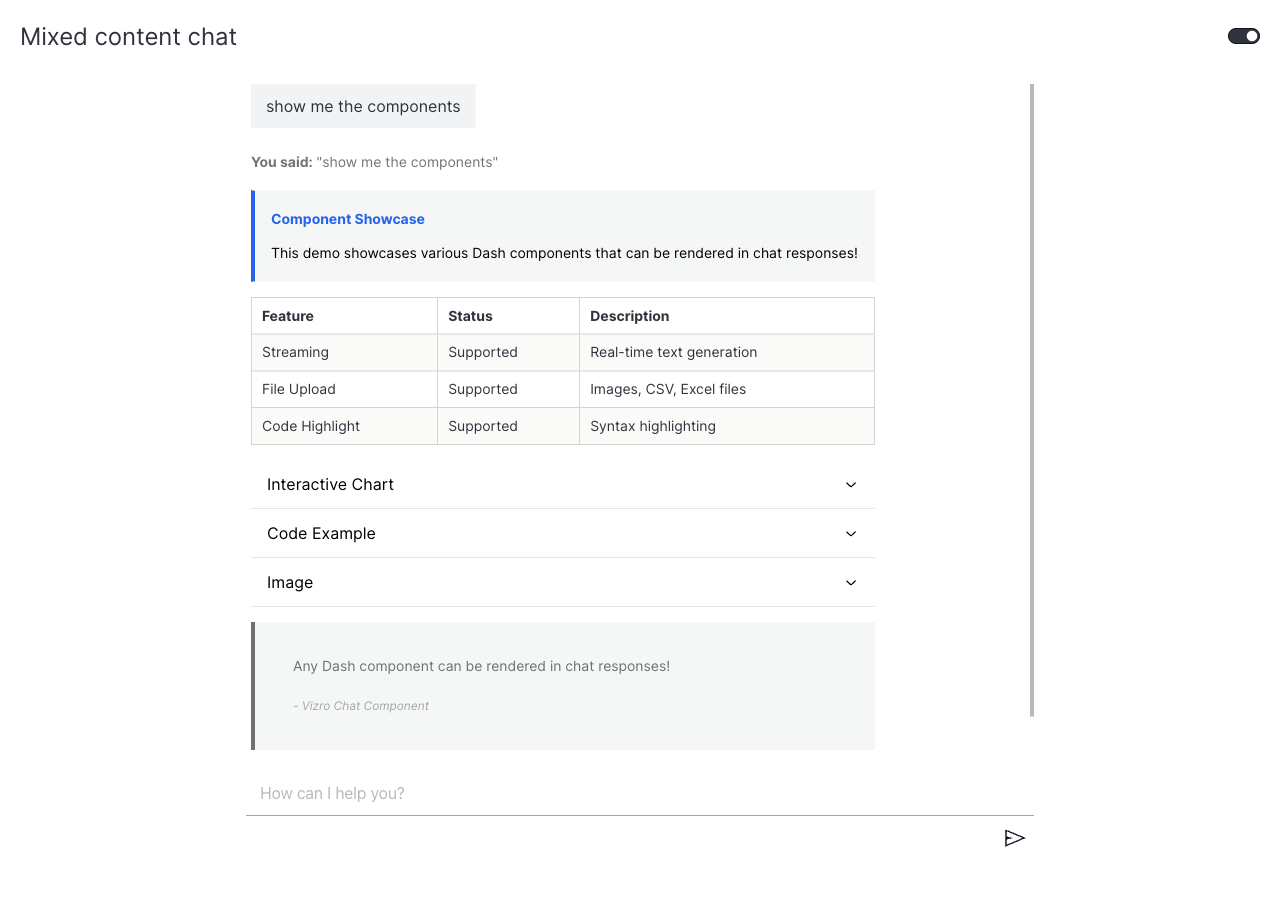
The highlighted blocks are the response body: Markdown intro, an Alert, a Table, an Accordion (containing a Plotly chart, a syntax-highlighted code block, and an image), and a Blockquote, all returned as a single html.Div.
What's next
- Add example questions: guide users with predefined prompts.
- Combine features: pair rich responses with file upload and example questions.